
Pourquoi cela compte
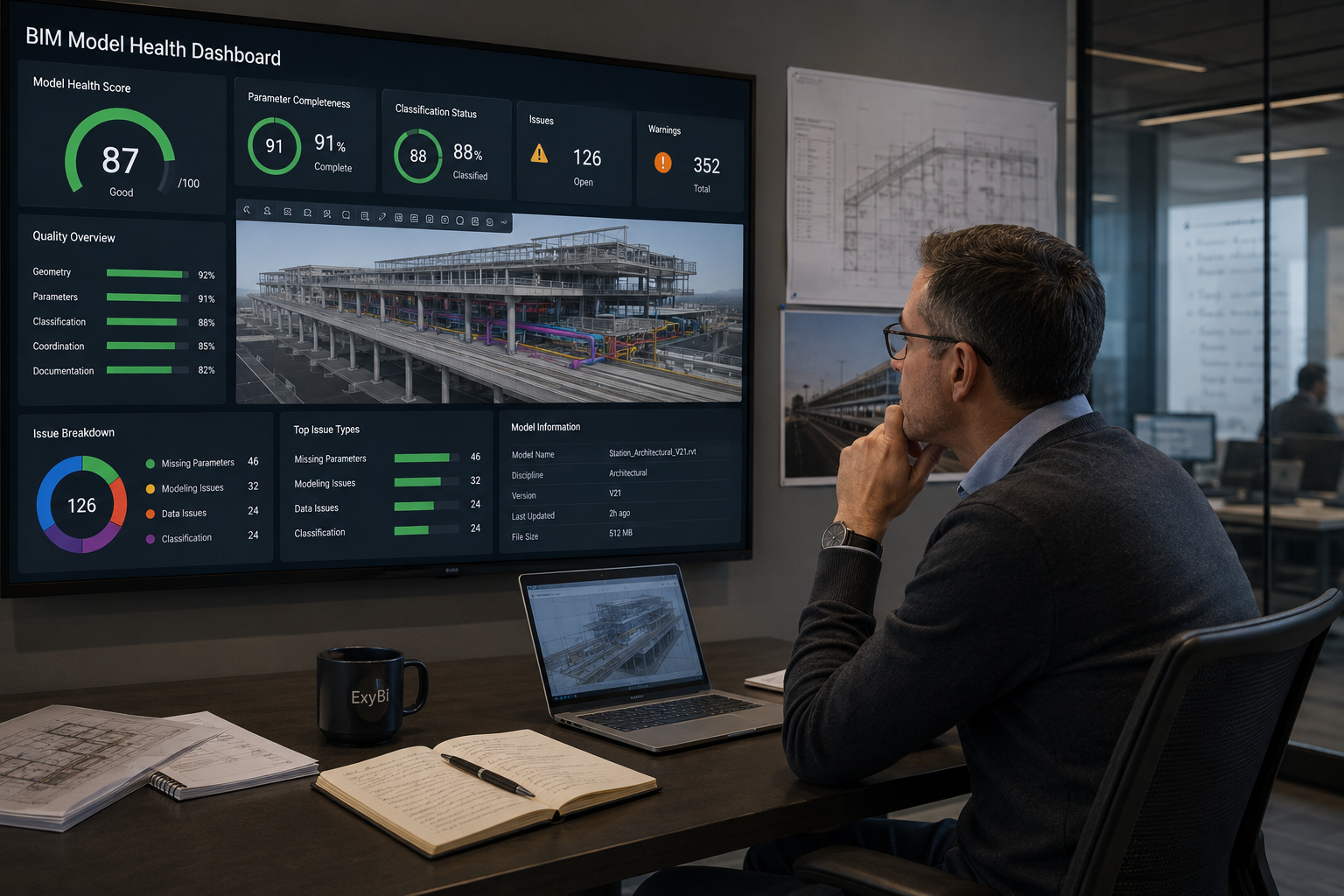
BIM quality management becomes stronger when the team can see patterns over time, not only defects inside the latest model file.
Section 1
Why isolated checks are not enough
Model checking is necessary, but it is not the same thing as model intelligence. A check tells the team what is wrong in a file at a point in time. Intelligence tells the BIM manager whether the project is learning, whether quality is improving, and whether a repeated issue belongs to one team, one package, one family library, or one unclear requirement.
On large infrastructure and rail projects, this distinction matters. A corridor project may have multiple design lots, several authoring teams, and different maturity levels across civil, structural, architectural, MEP, systems, and asset-information scopes. A single issue list can be technically correct and still fail to tell management where the project is losing control.
Traditional manual reporting often compresses model quality into status language: green, amber, red, or a paragraph in a weekly report. That can hide the most useful information. A model may be improving in geometry coordination while getting worse in parameter completeness. Another model may have fewer warnings but weaker classification. Without dashboards, those differences are hard to see and even harder to explain.
- Issue lists show defects, but not always direction of travel.
- Spreadsheets are easy to circulate but hard to maintain across model versions.
- Screenshots can support a point, but they do not create a repeatable quality history.
Section 2
How dashboards create model intelligence
A model-intelligence workflow starts by publishing consistent model data at regular points in the project rhythm. The point is not to drown the team in every available parameter. The point is to capture the signals that describe readiness: required data completion, warnings, categories, classifications, quantities, versions, model ownership, and review scope.
ExyBI helps by taking Revit model data and making it available in Power BI-ready form. Once that data is available, the BIM manager can compare one publish with another, filter by team or package, and watch whether correction requests are actually changing the model. ExyViewer then supports the visual side of the conversation when a data signal needs to be checked against model context.
This changes the tone of BIM quality meetings. Instead of asking whether a model is generally better, the team can ask specific questions. Did missing asset codes fall after the last review? Did warnings increase after a model merge? Did quantity movement come from real design change or from category misuse? Are the same consultant packages still missing the same fields?
- Track model health over time rather than reviewing each submission in isolation.
- Compare versions to separate expected design movement from data-quality drift.
- Use dashboard filters to connect quality problems to package, discipline, zone, or responsible team.
Section 3
What changes for BIM quality management
The practical result is a more mature quality loop. The BIM manager gets a dashboard that can show open data-quality gaps, recurring model defects, version-to-version movement, and the relationship between model readiness and reporting needs. That makes it easier to decide whether to accept a model for federation, return it for correction, or escalate a recurring governance issue.
Useful views might include parameter completion by discipline, classification consistency by package, warning trend by model version, element counts by level or location, quantities by category, and a publish history showing which model version produced which dashboard numbers. These are not decorative views. They give the BIM manager a way to defend decisions with evidence.
ExyBI does not replace checking rules, IDS requirements, or the professional judgment of BIM leads. It gives those controls a visible reporting layer. Over time, that helps the project move from reactive model checking to a more continuous understanding of model quality. On a large rail or infrastructure program, that difference can be the difference between managing quality and repeatedly rediscovering the same quality problems.
- Trend views for warnings, missing parameters, classifications, and quantities.
- Version comparison that shows what changed since the last model publish.
- Evidence for team accountability without turning every review into a manual investigation.
Points d’action
- Model checking finds defects; model intelligence shows patterns, trends, and accountability.
- ExyBI helps BIM managers reuse model data in Power BI instead of rebuilding quality reports by hand.
- Visual context through ExyViewer helps connect dashboard signals back to the actual model condition.
Point de réalité
- Trends are only meaningful when model publishes are consistent enough to compare.
- Dashboards should focus on decisions the BIM manager can actually influence, not every possible model statistic.
Commandes et fonctions liées
ExyBI
Versioned Revit publishes, Power BI trends, ExyViewer review context
Move from issue lists to quality signals
ExyBI is built for teams that want BIM quality data to become reusable dashboard evidence across model versions, packages, and review cycles.
Explore ExyBI